Real-Time Miner Fee and Network Fee Tracker
A real-time miner fee and network fee tracker shows the current transfer cost on major networks such as Bitcoin and Ethereum, helping users pick the right moment to send a transaction and avoid steep fees during peak hours.
Every transaction on a blockchain requires a network fee (called a miner fee on Bitcoin and a gas fee on Ethereum). Fees move in real time with network congestion, and a tracker lets you see the current cost before you send. This guide explains how to check and use that data efficiently.
What can a miner fee / network fee tracker show?
Mainstream trackers usually provide the following core information:
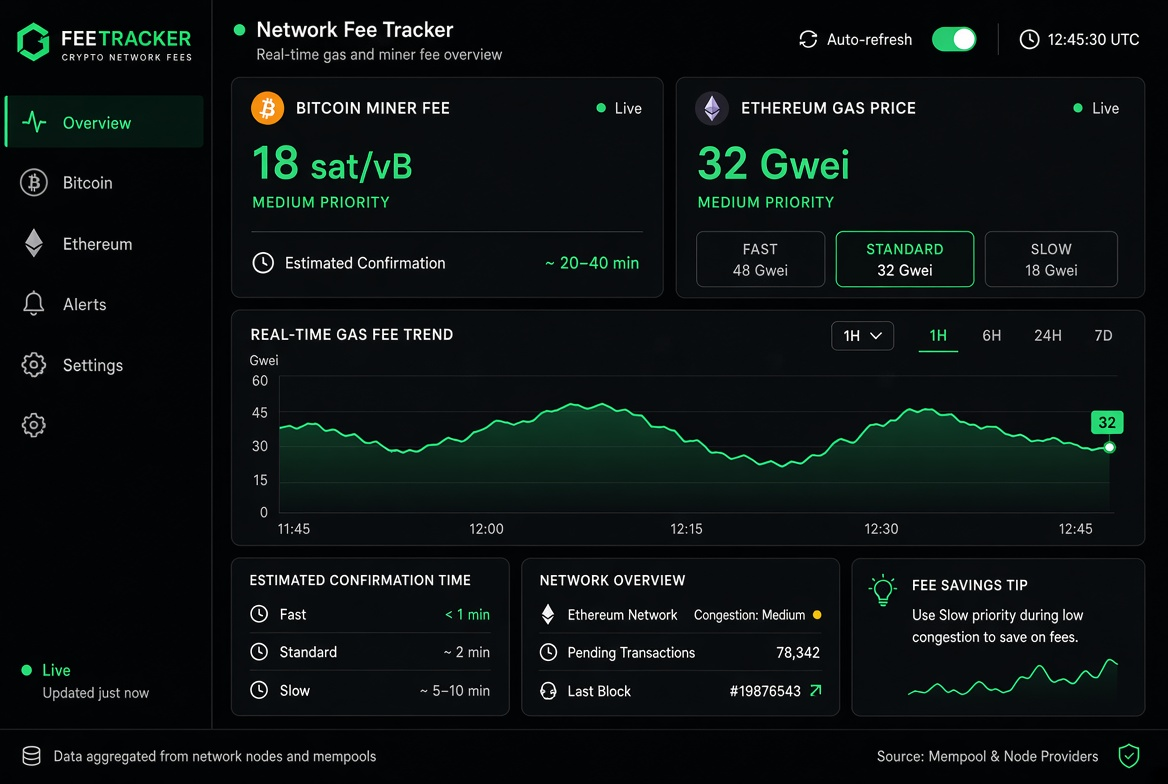
Current recommended fees: Suggested values for fast, standard, and economy tiers.
Real-time fee trends: A fee curve for the past few hours or 24 hours.
Estimated confirmation time: The rough on-chain time for each fee tier.
Multi-chain support: Bitcoin (Satoshi/vB), Ethereum (Gwei), and some Layer2 or major public chains.
Historical comparison: Whether fees sit near recent highs or lows.
This data helps users balance speed against savings.
How to check miner fees / network fees in real time (step by step)
Open a tracker site you use often or a fee panel built into your wallet (block explorers, exchange withdrawal pages, and dedicated gas trackers all work).
Select the relevant network (Bitcoin, Ethereum, and so on).
Check the current recommended fee tiers (fast / standard / economy).
Study the fee trend chart to judge whether you are at a congestion peak.
When sending from your wallet, adjust the fee manually or pick a recommended tier.
After broadcasting, track confirmation progress with the transaction hash on a block explorer.
It is simple to do, costs less than blindly accepting a high default fee, and fills a practical gap that top search results rarely explain systematically.
How to read fee data correctly
High-fee periods: Usually mean network congestion (many transactions queuing). Suited to urgent transfers; ordinary transfers can wait.
Low-fee periods: The network is idle, which suits non-urgent transfers or batch operations and cuts costs noticeably.
Confirmation time trade-off: The higher the fee, the higher the packing priority and the faster the confirmation; a fee that is too low can stall for a long time.
Differences between networks: Bitcoin is priced in sat/vB and Ethereum in Gwei, so the two cannot be compared directly.
Points to keep in mind:
Fees are dynamic, so the rate may change between your check and the actual send.
Wallet default fees are sometimes on the high side; a manual adjustment is more precise.
Under extreme congestion, even a higher fee may be delayed.
Use cases and risk notes
Everyday transfers: Check fees first and send during a low period.
Large or urgent transactions: Prioritise confirmation speed and raise the fee as needed.
Batch operations: Handle them together when fees are low to cut the total cost.
Risk note: Tracker results are for reference only, and the fee actually charged is the one your wallet finally broadcasts. A fee that is too low may leave a transaction unconfirmed for a long time, which requires accelerating or replacing it. Make sure the data comes from official or trusted sources.
FAQ
**Q1: What is the difference between a Bitcoin miner fee and an Ethereum gas fee?**A: Bitcoin is priced in sat/vB (satoshis per virtual byte) and packed by miners, while Ethereum is priced in Gwei to pay for computational resources (gas). The mechanisms differ, so trackers usually display them separately.
**Q2: Why do fees sometimes spike suddenly?**A: Mainly because the network is flooded with pending transactions (congestion), and users compete for packing priority, which pushes fees up.
**Q3: What happens if I set the fee too low?**A: The transaction may sit unconfirmed in the mempool for a long time, and in serious cases it needs to be accelerated or cancelled and resent.
**Q4: How do I tell whether fees are high or low right now?**A: Look at the trend chart the tool provides or compare with the recent average; a rate clearly below that average is usually a good time to send.
**Q5: What should beginners focus on when checking fees?**A: Look first at the recommended value and estimated confirmation time for the standard or economy tier, and avoid defaulting to the highest tier.
Recommended
View more